




Description
multi-account trade copier add-on designed to replicate leader-account orders across multiple follower accounts while keeping configuration, start and stop control, and risk handling in one interface. It supports leader-to-follower mapping, instrument filters, ratio and min/max quantity limits, reverse copying, stealth mode, and runtime log output, making it useful for synchronized execution, account segmentation, and semi-automated trade coordination.
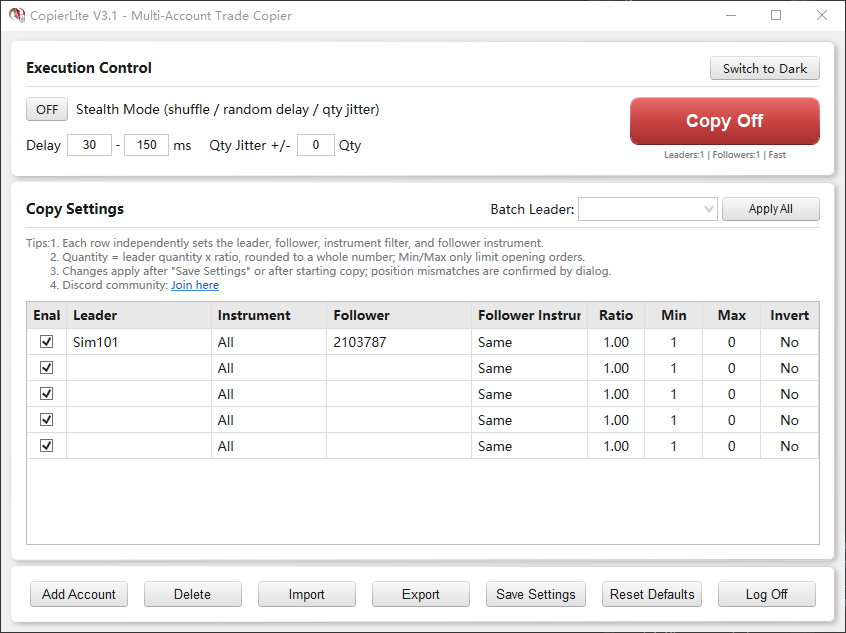
Core capabilities:
Copy setup
• One-to-many and many-to-many copying:
Each row defines a separate Leader -> Follower mapping, and multiple leader
accounts can run in one window.
• Fast copying:
– Leader market-order signals are copied as quickly as possible.
– Limit, stop, and target orders are generally copied after the Leader fills.
– Close-side signals also follow the Leader’s action directly under the
current row settings.
• Duplicate protection:
The same Leader trade is normally copied only once.
• Multi-row safety:
CopierLite avoids copying its own Follower orders again in multi-row setups.
Instruments and quantity
• Same-contract and cross-contract copying:
Supports Same, Micro, and Standard automatic conversion, or a manually
specified target instrument such as NQ -> MNQ or ES -> MES.
• Quantity ratio:
Follower quantity = round(leader quantity x ratio), with a minimum of 1.
• Min / Max quantity:
Applies only to opening trades.
Closing trades are not capped by Min / Max, which helps the follower exit
its matching position when the leader exits fully.
• Invert copy:
Leader long -> follower short, and vice versa.
Stealth Mode
• Random execution order:
Follower execution order can be randomized.
• Random delay:
Followers are staggered with configurable random delays in sequence.
• Quantity jitter + auto compensation on close:
Random quantity variation is applied on opening orders, and cumulative
deltas are compensated on closing orders to keep the final position closer.
• Blank copied order names:
Copied order names are left blank by default, closer to manual orders.
Theme and UI
• Dark / light dual theme:
A theme toggle is available in the top Execution Control section.
• Auto-follow NinjaTrader theme:
On first launch, CopierLite detects the current NinjaTrader theme and
applies the matching UI automatically.
• Title bar theme sync:
The window title bar tries to follow the selected theme.
• Theme persistence:
Manual theme changes are saved and restored on the next launch.
Operations and usability
• Standalone window: launched from Control Center > New > CopierLite Copier,
with no chart attachment required
• Settings persistence: settings can be saved, imported, exported, and restored
after restarting NinjaTrader
• Safer save and import: failed saves keep the previous configuration; failed
imports do not replace the current table
• Batch operations: batch leader assignment, Ctrl/Shift multi-row delete, and
log toggle are built in
• Lightweight runtime notice: statistics stay visible; position mismatch
warnings do not interrupt active trading with popups
• Clean shutdown: stopping copy clears session state; unfinished jitter
compensation prompts for confirmation first